
In This Article
OverviewNavigation
Tracking Approvals in the Change Log
- What Approvals Events Are Tracked
- Viewing Approvals Audit Entries
- Understanding Each Event Type
- Accessing the Approvals Audit Trail
Overview
The Idea/Initiatives Approvals feature in WiredUp provides a structured governance framework that ensures ideas/initiatives progress through defined stages with proper stakeholder validation and oversight. Each Idea/Initiative definition contains specific rules, workflows, and stakeholder requirements that must be satisfied before an idea can advance. Accessible through the burger menu on the Idea/Initiative screen, the Approvals page displays all workflows (checklists) organized by stage, showing which roles must approve each checklist before the Idea/Initiative can move forward.
The system enforces strict approval protocols such as:
- All required stakeholder roles must be populated before submission
- Changing an Idea/Initiative definition after approval resets progress to the first stage
- Existing approvals are cancelled when the definition is updated
- Stage dates and assigned stakeholders are removed upon definition changes
- Once an Initiative is approved, the definition becomes locked to maintain integrity
The approval process is streamlined with features including:
- Automatic approval when the checklist submitter is also an approver
- Email reminders with comments to notify stakeholders
- Visual indicators including checkmarks and green dates to track approval status
Only stakeholders listed under Idea Definition > Workflows > Roles can approve requests, as ad-hoc stakeholder approvals are not supported
This comprehensive approval mechanism ensures that every Initiative undergoes rigorous evaluation by the appropriate stakeholders at each critical stage of its lifecycl
Navigation
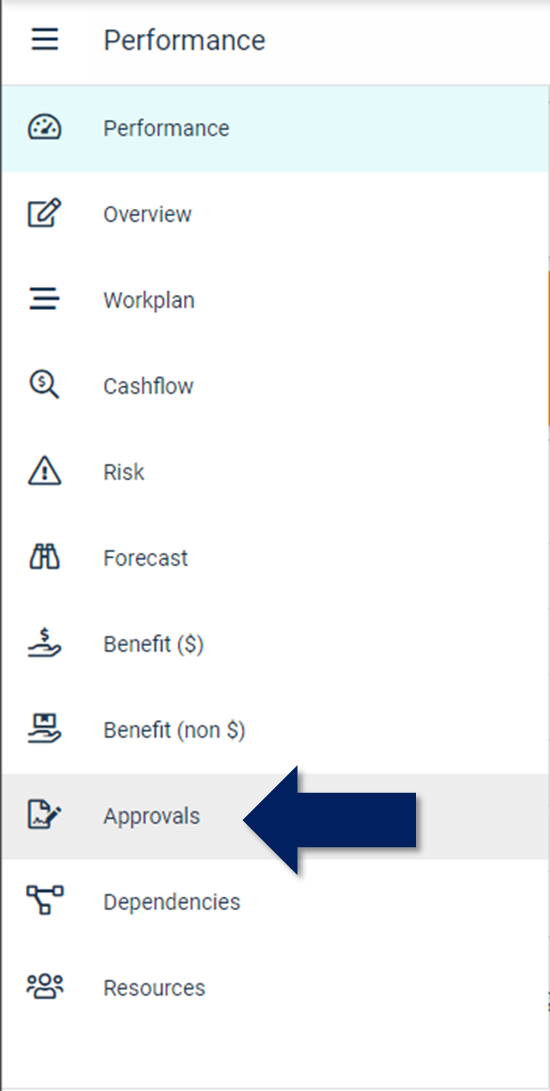
Upon opening the initiative's screen, choose the burger menu icon located on the left side of the initiative, and then select the Approvals option.
The following changes will be made when the Initiative definition is updated.
- All existing approvals will be cancelled.
- Stage dates will be removed e.g Evaluating, Implementing etc.
- Assigned Stakeholders will be removed
Once the Idea is approved, the Initiative definition cannot be changed, a lock icon next to the selected Idea definition will be shown as below:


| The colour status under each stage indicates if the Idea is on/off track based on the forecasted timeline entered in the workplan; this date is shown below each stage. |
 | The workflows under each stage are the checklists that need to be completed and approved to allow the Idea to move to the next stage. |
 | Prior to submitting a checklist for approval, each checklist shows the list of roles that need to approve. |

Note: To complete a checklist, click on the bold name of the checklist, answer each question then submit it for approval. You will not able to submit a checklist for approval until all the required stakeholder roles for that workflow are populated.
Once the checklist has been submitted for approval, the list of approvers and the date the checklist was submitted to the approver are shown below each checklist.
You can send an email reminder to the stakeholder reminding them to complete the approval and add any required comments on the sent notification.
Note: Only stakeholders listed under the Idea Definition > Workflows > Roles will be able to receive and approve a request, ad-hoc stakeholder approvals are currently not supported for all workflows including the Initiative Form
If the person submitting the checklist is also an approver, their approval is automatically approved by the system.
Once the checklist has been approved, a check appears next to the approver's name, with the approval date in green.

Click on Stakeholders highlighted above, to specify the stakeholders for the Idea who will be responsible for approving the relevant workflows under each stage, allowing the Idea to progress along the different stages.

Note: Changes to Idea Approvals are saved automatically.
Tracking Approvals in the Change Log
The Change Log on Initiatives and Ideas now captures a complete audit trail of all approvals-related activities, including checklist submissions, individual approvals, stage progressions, and approval resets.
What Approvals Events Are Tracked
The Change Log automatically records the following approvals workflow events:
- Checklist submissions — when a user submits a checklist for approval
- Individual approvals — each time an approver approves a checklist
- Stage progressions — when an Initiative or Idea moves to the next stage
- Approvals resets — when Initiative definition changes cancel all existing approvals
Viewing Approvals Audit Entries
All approvals-related events appear in the existing Change Log panel on the Initiative or Idea record. Each entry follows the standard Change Log card format, showing:
- A descriptive header indicating the event type
- A message with relevant details
- The user avatar and name of the person who performed the action
- A timestamp showing when the event occurred
Understanding Each Event Type
Checklist Submitted:
When a user submits a checklist for approval, a Change Log entry is created showing: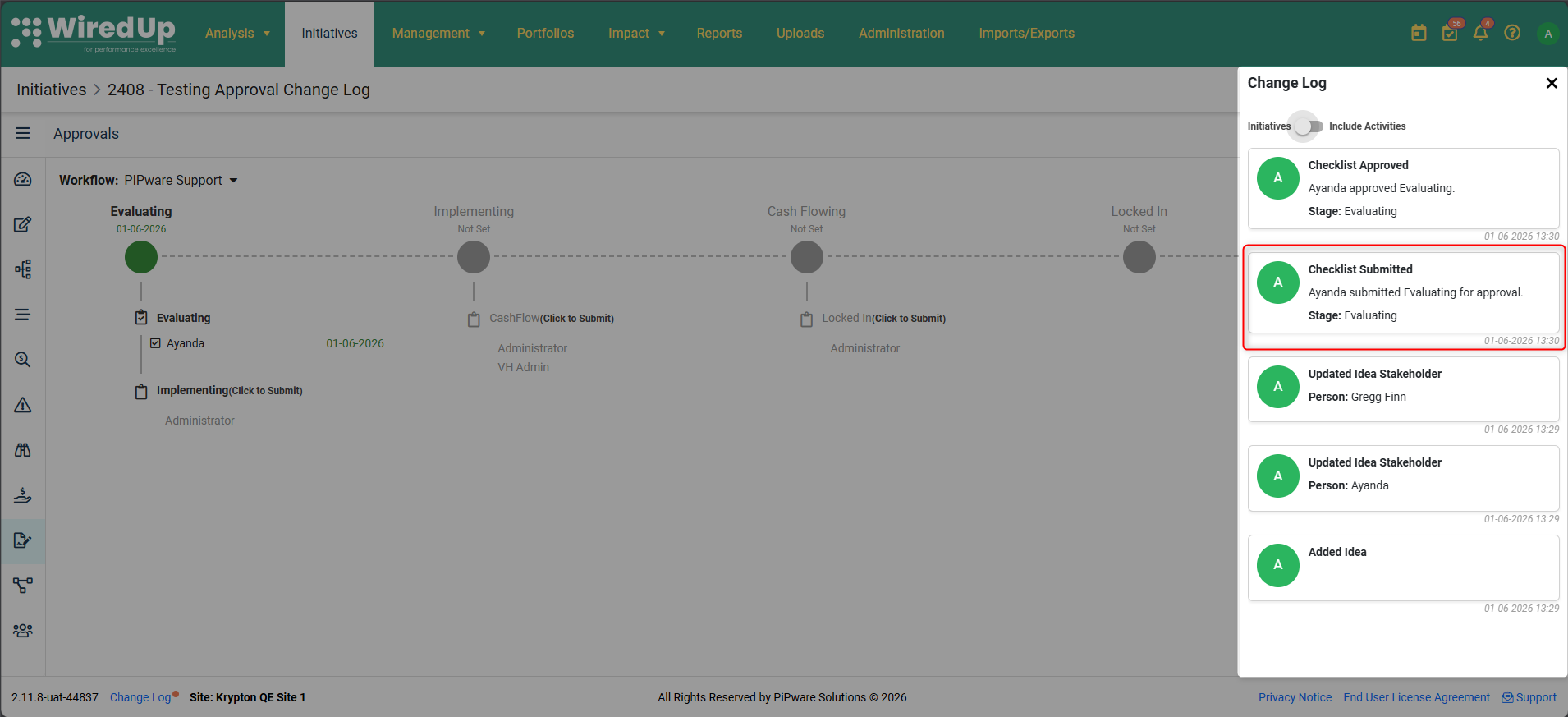
- Header: Checklist Submitted
- Message: [User Name] submitted [Checklist Name] for approval
- Additional detail: The stage the checklist belongs to
- User: The person who submitted the checklist
- Timestamp: Date and time of submission
Checklist Approved:
Each time an individual approver approves a checklist, a separate Change Log entry is created showing:
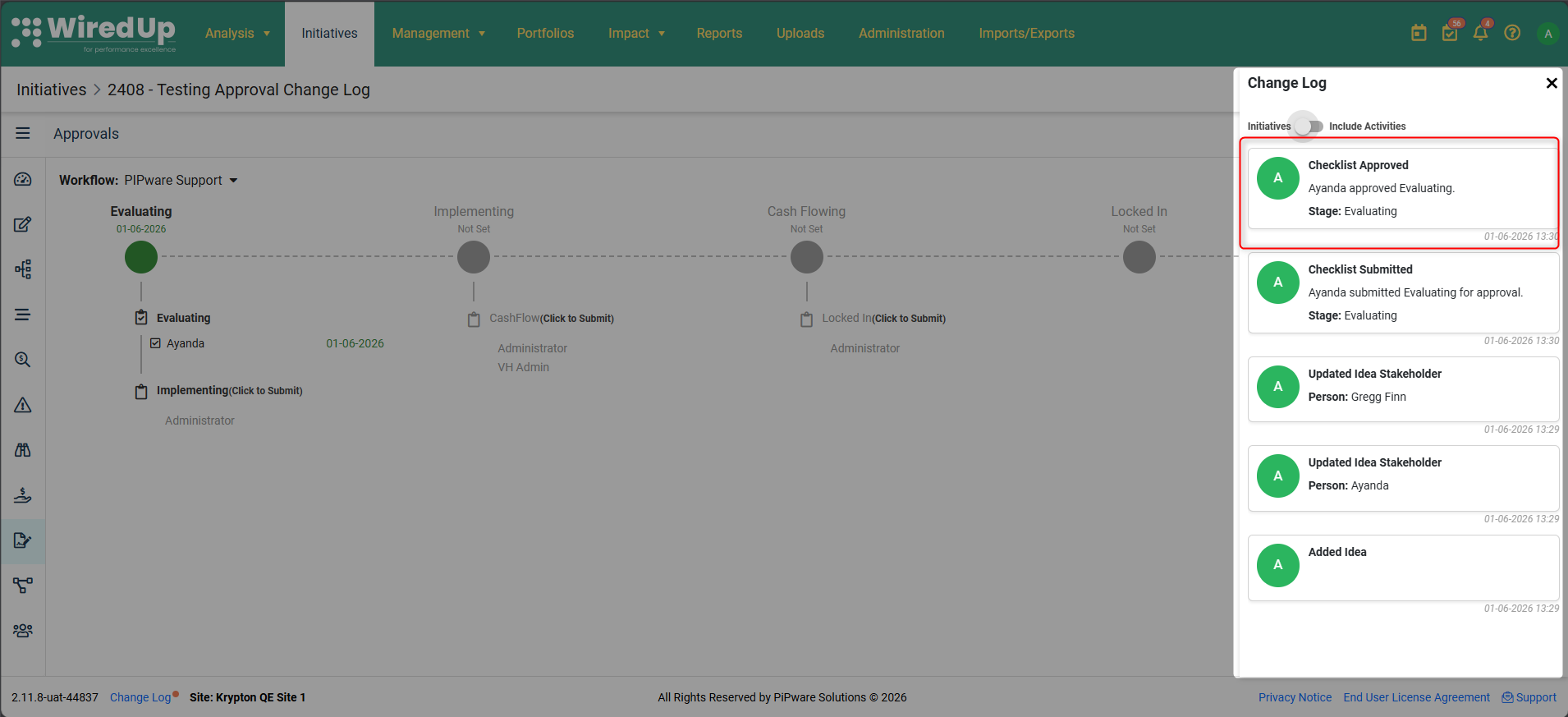
- Header: Checklist Approved
- Message: [Approver Name] approved [Checklist Name]
- Additional detail: The stage the checklist belongs to
- User: The approver who completed the approval
- Timestamp: Date and time of approval
If the submitter is also an approver, the system auto-approves their approval and creates a Change Log entry reflecting this auto-approval.
Stage Progressed:
When all required checklist approvals are completed for the current stage and the Initiative or Idea moves to the next stage, a Change Log entry is created showing: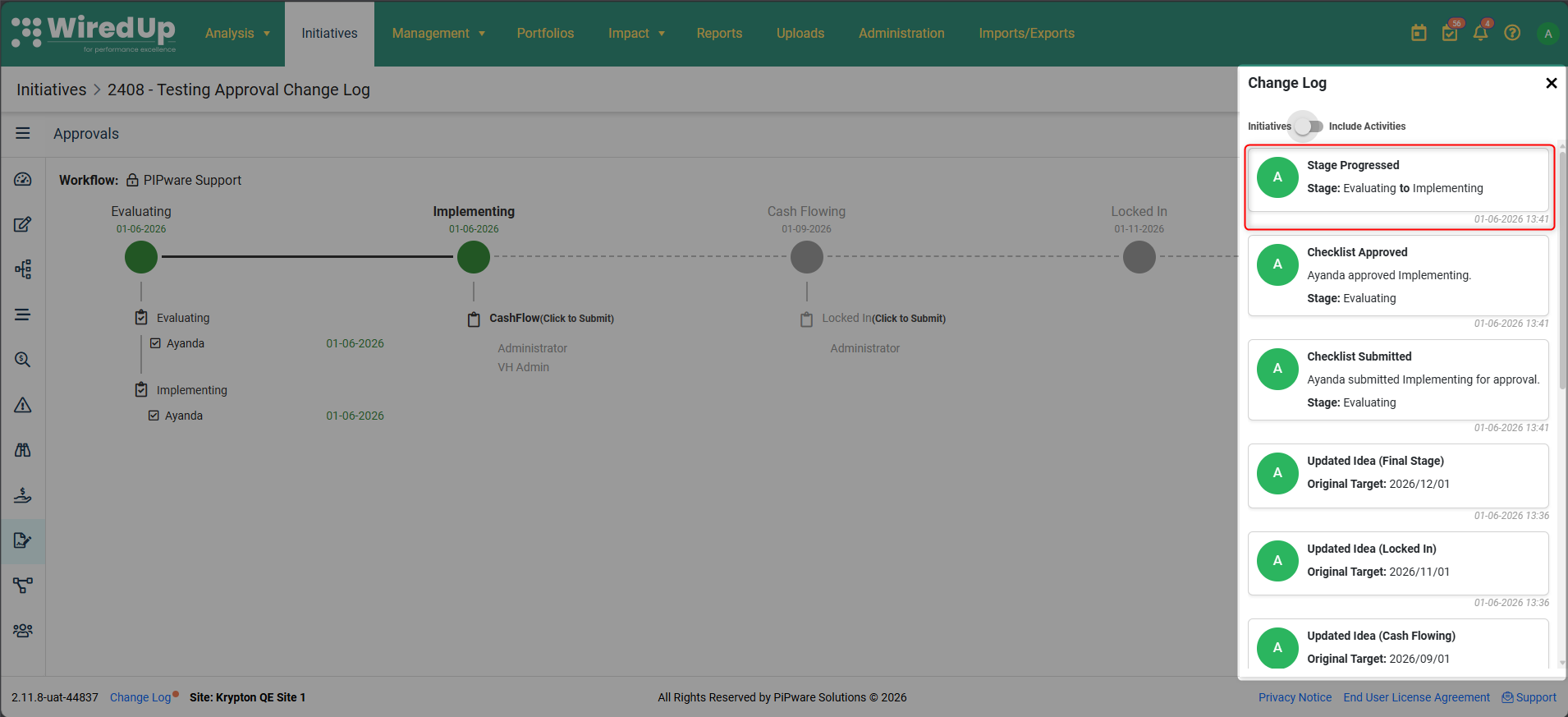
- Header: Stage Progressed (or Stage Regressed if moving backward)
- Stage: [Previous Stage Name] to [New Stage Name]
- User: The person whose final approval triggered the stage progression
- Timestamp: Date and time of stage progression
Approvals Reset:
When the Initiative definition is changed, all existing approvals are cancelled, stage dates are removed, and the Initiative resets to the first stage. A Change Log entry is created showing: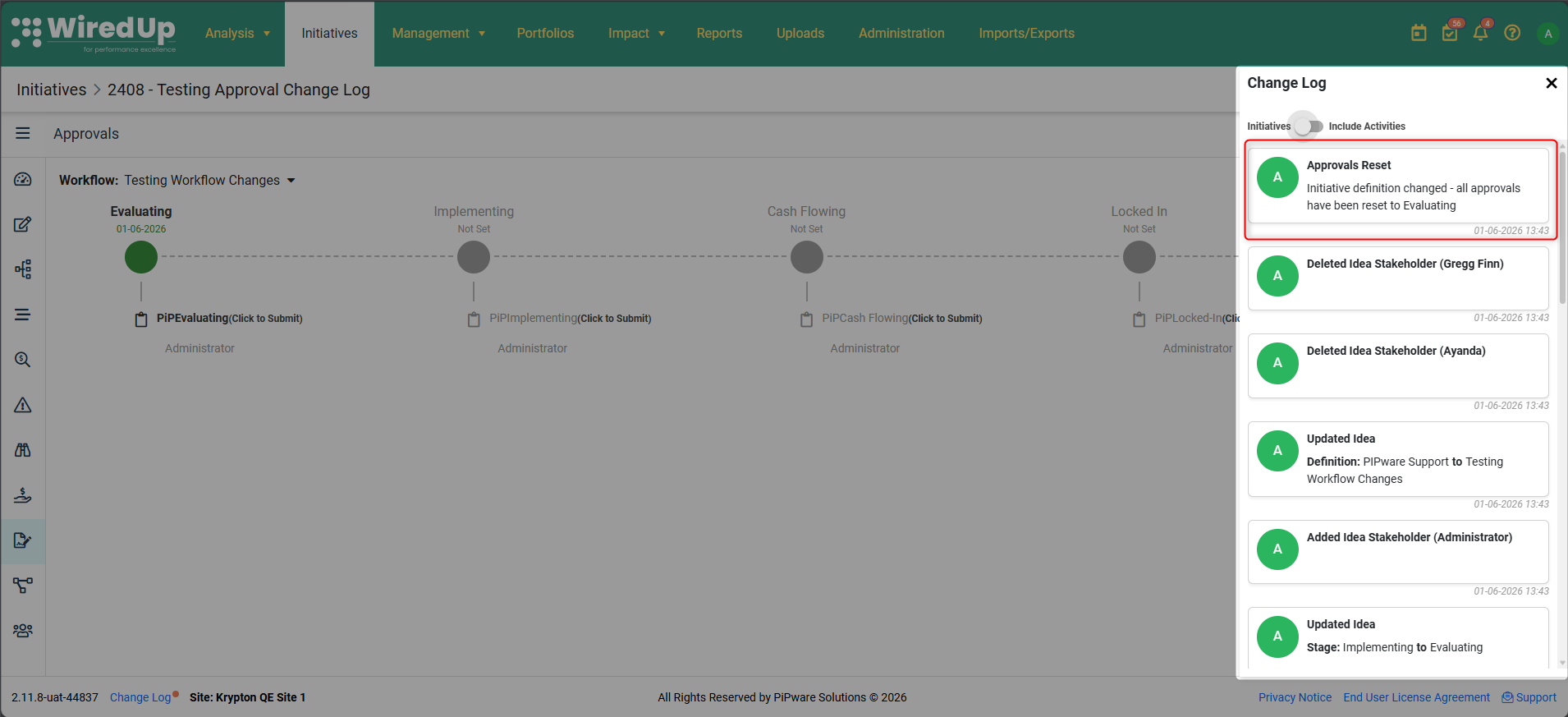
- Header: Approvals Reset ([Idea Definition Name])
- Message: Initiative definition changed — all approvals have been reset to [First Stage Name]
- User: The person who changed the Initiative definition
- Timestamp: Date and time of the reset
Accessing the Approvals Audit Trail
Any user with access to view the Change Log on an Initiative or Idea can view all approvals audit entries. No additional permissions are required beyond existing Change Log view access.
Note: This approvals audit trail applies to all workflow types and all stages configured under the Initiative or Idea definition. Each approval event is recorded individually to provide a complete and transparent history of the approvals process.
Next Steps:
Please see the following article on Ideas Forecast.