
In This Article
How do I know if I'm affected?
What should I do in the meantime?
Overview
This article explains a known issue where duplicate Non-Financial benefit node rows appear on the VDT Benefit Page, causing incorrect benefit aggregation calculations.
What is the issue?
On the VDT Benefit Page (VDT View table), certain Non-Financial (non-$) benefit nodes may appear as duplicate rows, causing the root benefit aggregation to be incorrectly calculated and resulting in values being double or triple counted.
When does this occur?
The duplication occurs specifically when:
- A parent non-financial node has a child non-financial node of the same type
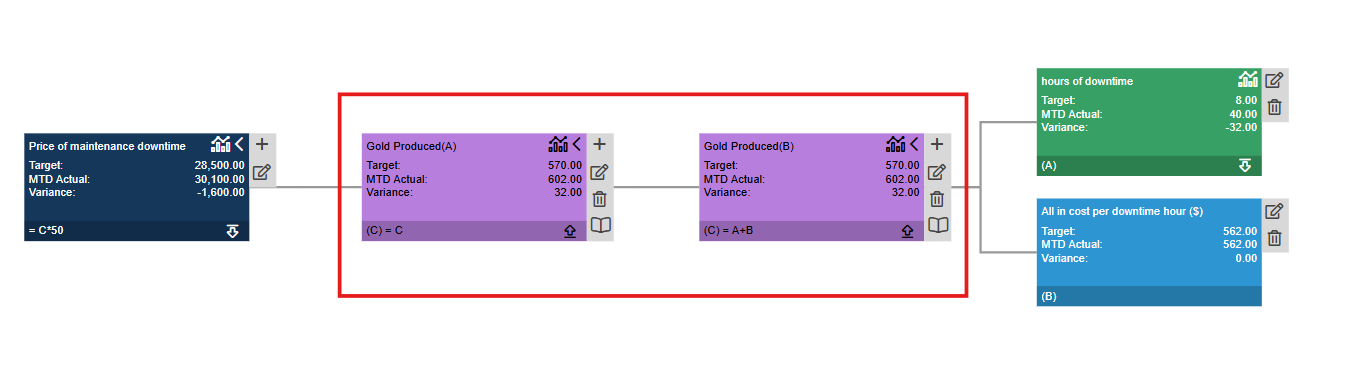
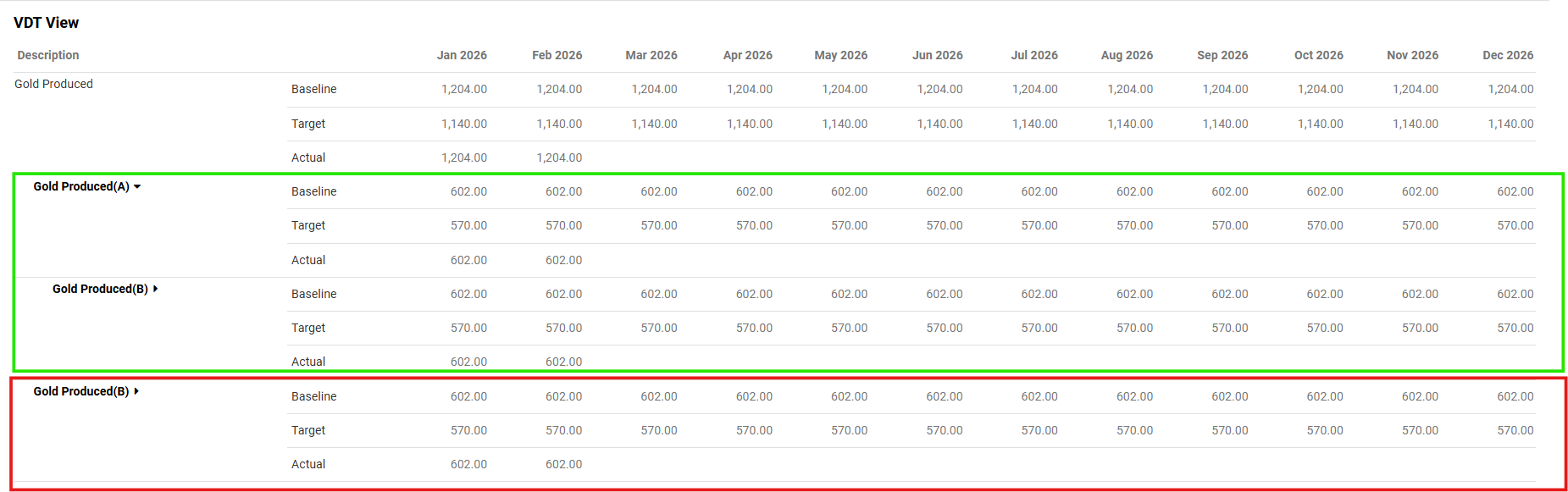
- Example: A "Gold Produced(A)" parent node with a "Gold Produced(B)" child node
Example Scenario
- VDT Canvas:
- Non-Financial Benefit Page for Gold Produced:
What you see:
- VDT Canvas: Displays correctly - "Gold Produced(B)" appears once
- Benefit Page (VDT View table): "Gold Produced(B) " appears twice (duplicate row)
- Result: Root "Emissions" benefit total is double-counted
What is NOT affected?
✅ Financial ($) benefit views - Financial nodes and their aggregations remain correct and do not show duplication
✅ VDT canvas view - Non-Financial nodes roll up correctly into parent/root nodes
✅ Non-Financial nodes with different types - Only nodes where parent and child share the same type are affected
How do I know if I'm affected?
You may be affected if:
- You use Non-Financial benefit nodes in your VDTs
- Your VDT structure includes parent and child nodes of the same type
- You notice inflated benefit totals on the Benefit Page that don't match the VDT canvas
When will this be fixed?
Release 2.11.6-2 scheduled for 10 March 2026 will include:
✅ Removal of duplicate Non-Financial node rows on the Benefit Page, ensuring each node appears only once
✅ Automatic rectification of node values - any values previously inflated due to duplicated nodes will be corrected to reflect accurate benefit totals
After the fix is deployed:
- No action required on your part
- Benefit Page calculations will automatically correct
- Duplicate rows will no longer appear
- Root benefit aggregations will be accurate
Frequently Asked Questions
Q: Do I need to re-enter any data?
A: No. The fix is automatic and will correct the calculations without requiring any data re-entry.
Q: Are my Financial benefits affected?
A: No. Financial ($) benefit views are not affected by this issue and display correctly.
Q: Will this affect my reports?
A: If your reports pull Non-Financial benefit data from the Benefit Page and you have affected VDT structures, the totals may be overstated. After the fix is deployed, reports will automatically show corrected values.
Q: How can I identify which of my VDTs are affected?
A: Review your VDT structures and look for cases where:
- A parent Non-Financial node has a child Non-Financial node
- Both nodes are of the same type (e.g., both "Gold Produced" or both "Emissions")
Need Help?
If you have questions about:
- Whether your specific VDT structures are affected
- How to interpret your benefit calculations in the meantime
- The upcoming fix and its impact on your data
Please contact our support team at support@wiredup.global