
In This Article
Accessing RAR Frequency Settings
Choosing Your Recurrence Pattern
Setting an End Date (Optional)
Understanding RAR Review Interval Days
What Happened to the Old Frequency Options?
Overview
When setting up a RAR (Results Action Review) series, you can now configure exactly how often your RARs repeat using flexible weekly or monthly scheduling. This gives you full control over your RAR cadence - whether you need RARs every week, every 3 weeks, monthly, or every 2 months.
Accessing RAR Frequency Settings
To configure your RAR recurrence:
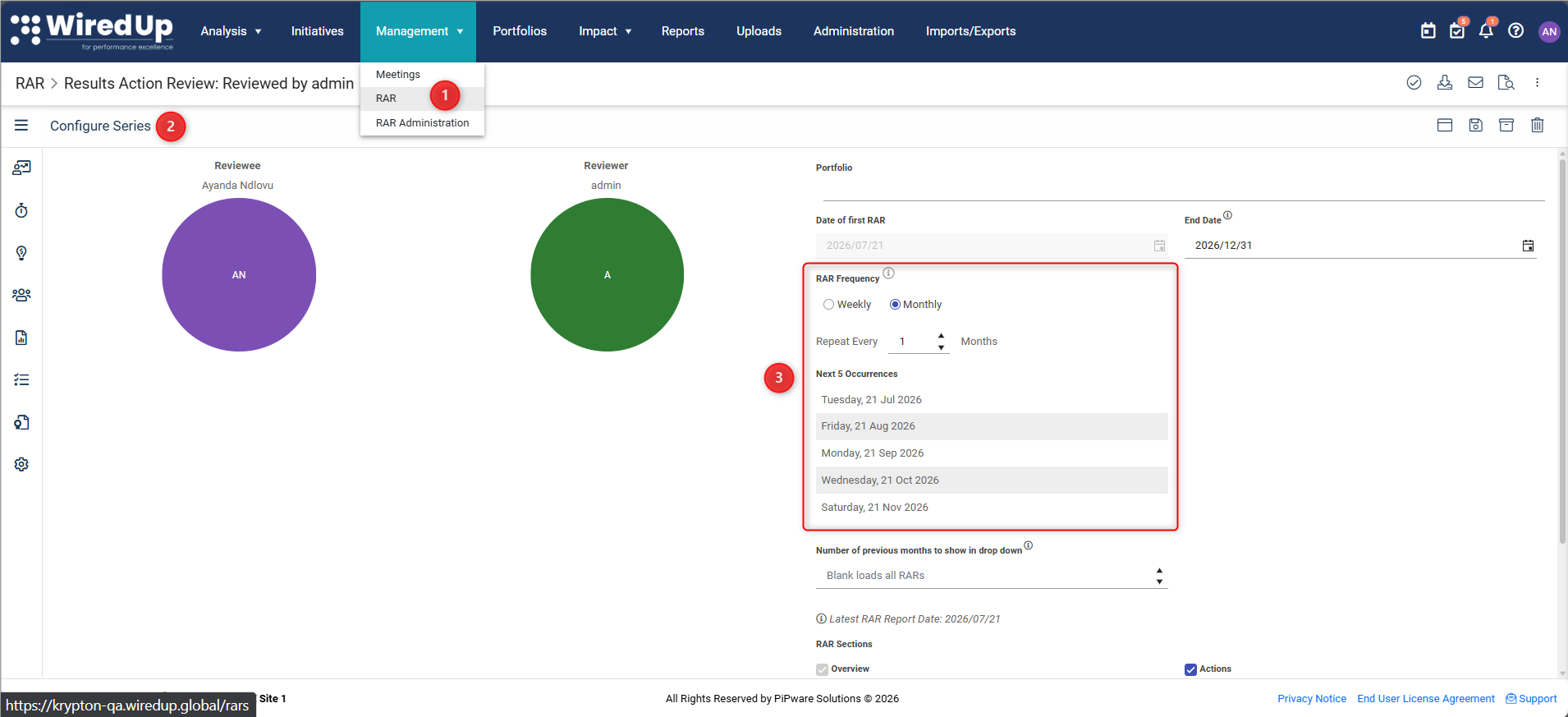
- Navigate to Management > RAR
- Create a new RAR series or edit an existing one
- If you are creating a new RAR series, continue to step 4
- If you are editing an existing RAR series, navigate to Configure Instance from the side-bar menu then click on Configure Series
- Locate the RAR Frequency section
Choosing Your Recurrence Pattern
You have two recurrence options to choose from:
1. Weekly Recurrence
Schedule your RARs to repeat every N weeks.
To configure:
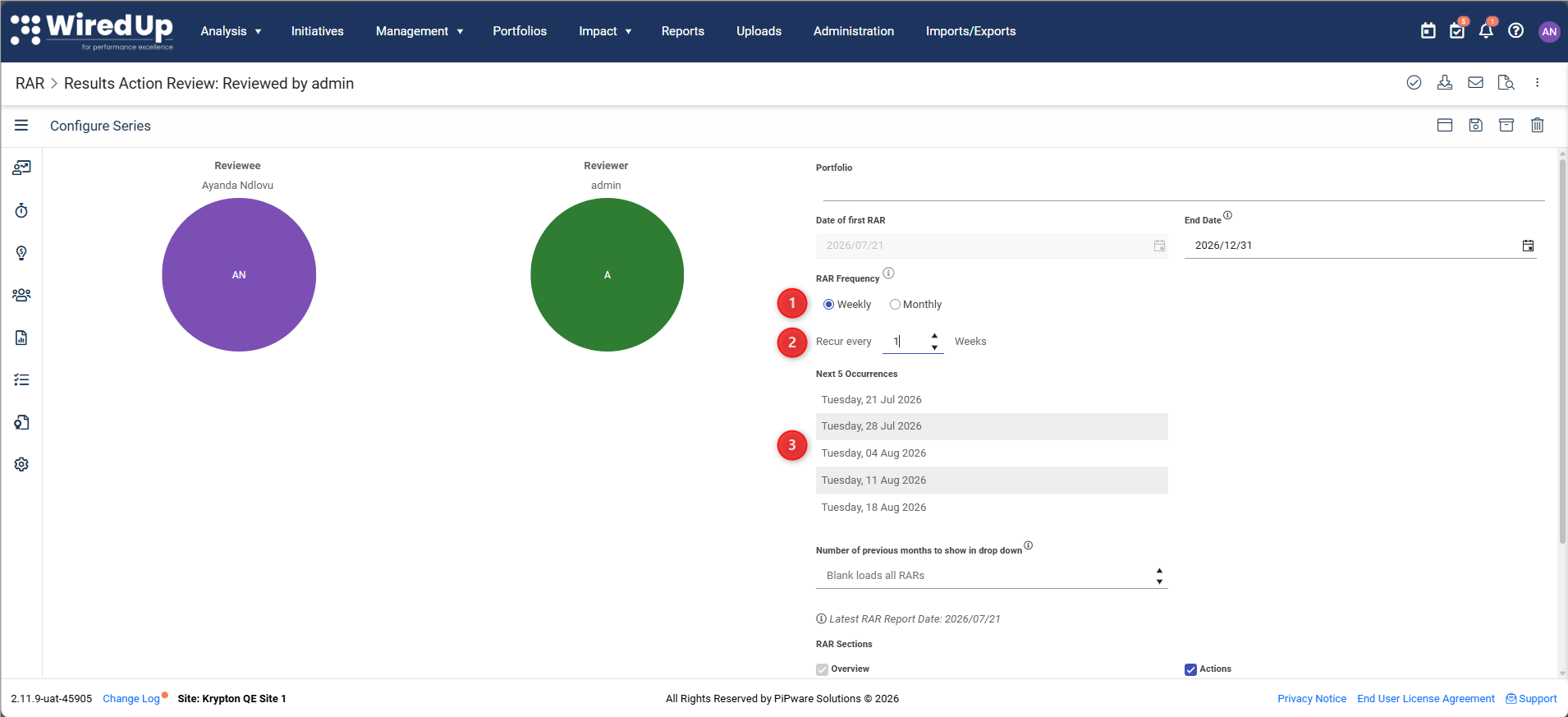
- Select the Weekly option
- Enter the number of weeks between each RAR (e.g., "Recur every 2 week(s)" for fortnightly RARs)
- The day of the week is automatically determined by your Date of first RAR
Example: If your first RAR is scheduled for Tuesday, June 23, 2026, and you set the interval to 1, all future RARs will occur every Tuesday.
Interval range: 1–30 weeks
2. Monthly Recurrence
Schedule your RARs to repeat every N months.
To configure:
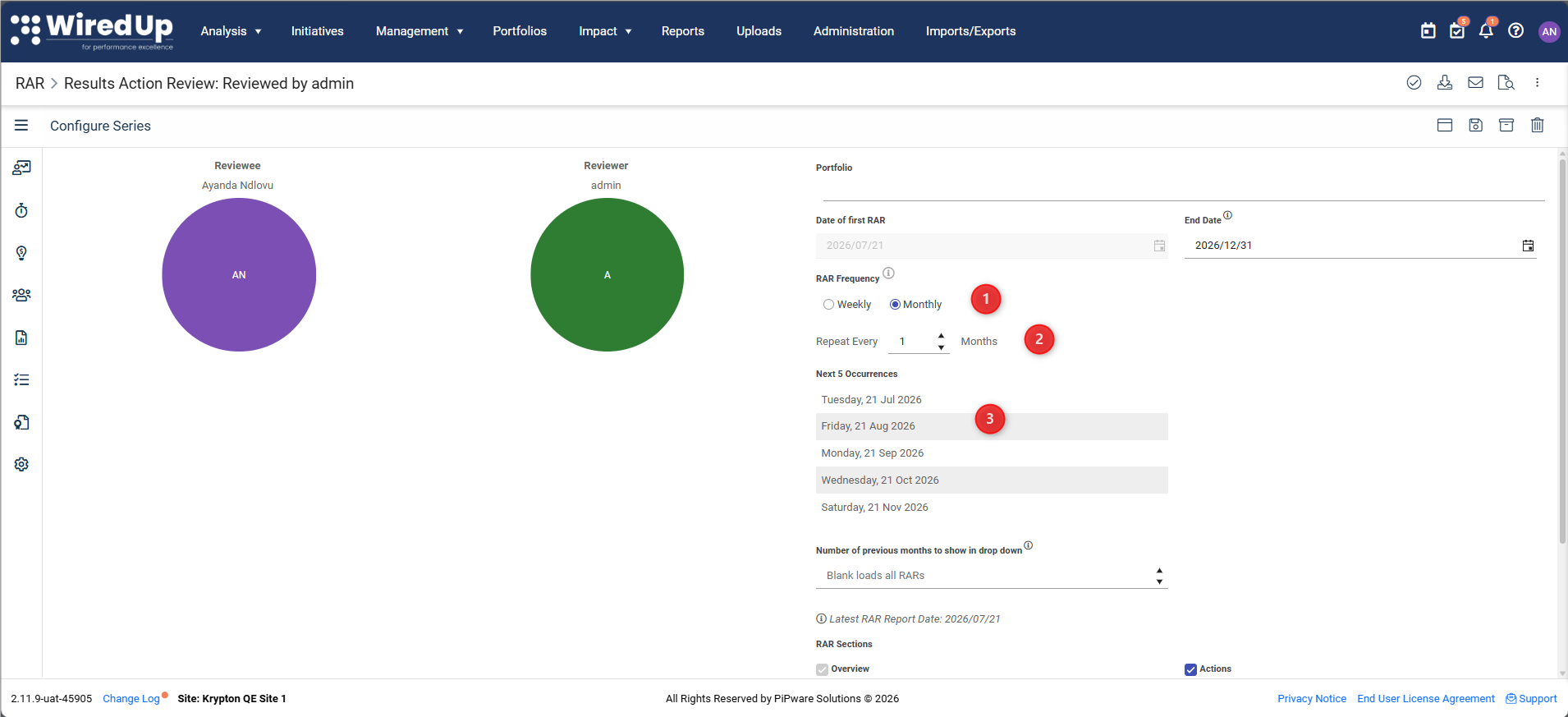
- Select the Monthly option
- Enter the number of months between each RAR (e.g., "Repeat every 2 month(s)" for bi-monthly RARs)
- The day of the month is automatically determined by your Date of first RAR
Example: If your first RAR is scheduled for the 23rd of June 2026, all future RARs will occur on the 23rd of every N months.
Special case: If your first RAR falls on a day that doesn't exist in some months (e.g., the 31st), the system will automatically schedule the RAR for the last day of that month (e.g., April 30th instead of April 31st).
Interval range: 1–30 months
Preview Your Schedule
As you configure your recurrence, the Next 5 Occurrences preview shows you the upcoming RAR dates based on your settings. This preview updates automatically when you:
- Change the recurrence type (Weekly/Monthly)
- Adjust the interval
- Modify the Date of first RAR
- Set or change the End Date
Preview rules:
- If your Date of first RAR is in the future, occurrences are shown from that date
- If your Date of first RAR is in the past (when editing an existing series), occurrences are shown from today's date
- If you've set an End Date, only occurrences before that date are shown
- If fewer than 5 occurrences exist before the End Date, only the available occurrences are displayed
- If no Date of first RAR is set, the preview will not display
Setting an End Date (Optional)
The End Date field allows you to specify when your RAR series should stop. This is optional—if you don't set an end date, your RARs will continue indefinitely according to your recurrence pattern.
To set an end date:
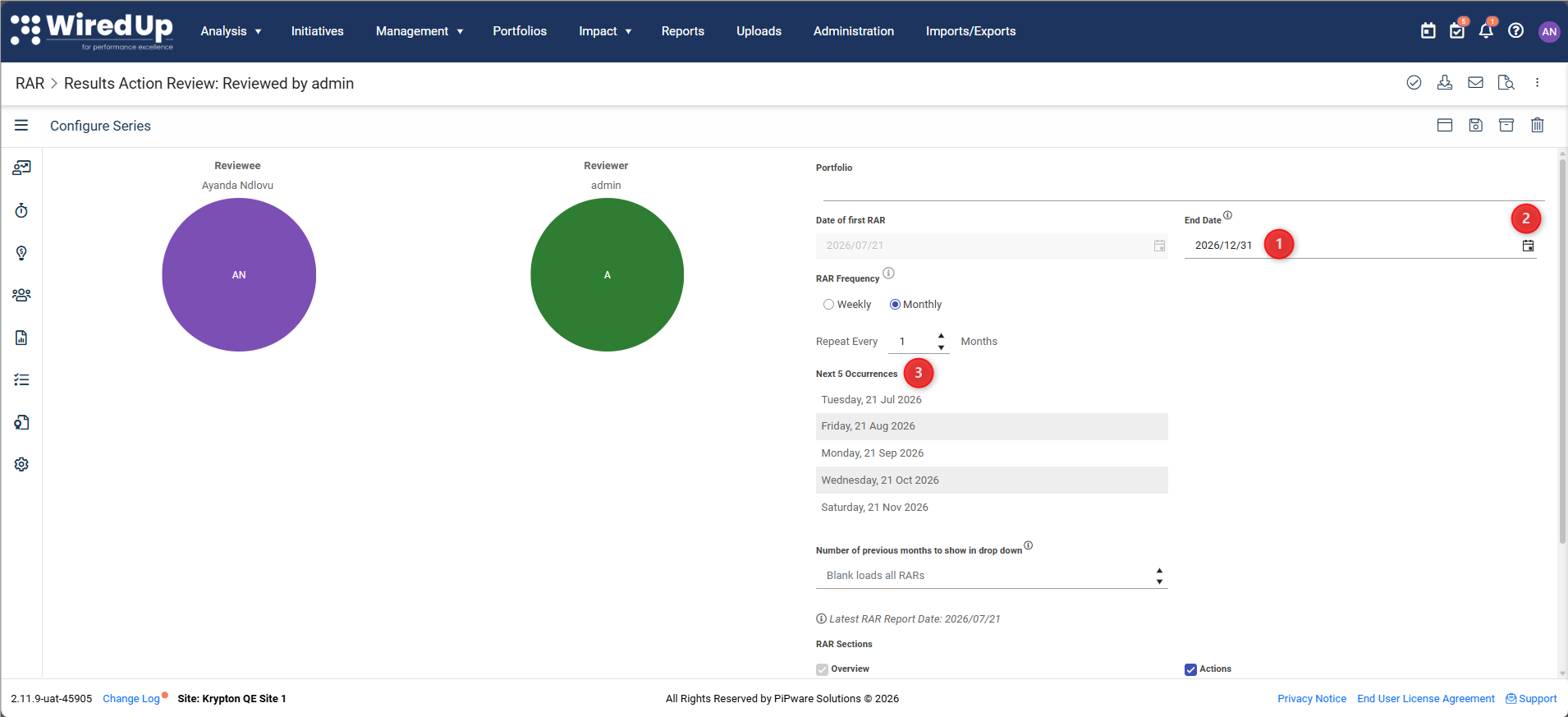
- Locate the End Date field in the Configure Series panel
- Select the date when you want the series to end
- The Next 5 Occurrences preview will automatically respect this date
Understanding RAR Review Interval Days
You'll notice an information icon (ⓘ) next to the RAR Frequency label. Hover and click over this icon displays important information about the RAR Review Interval Days global setting.
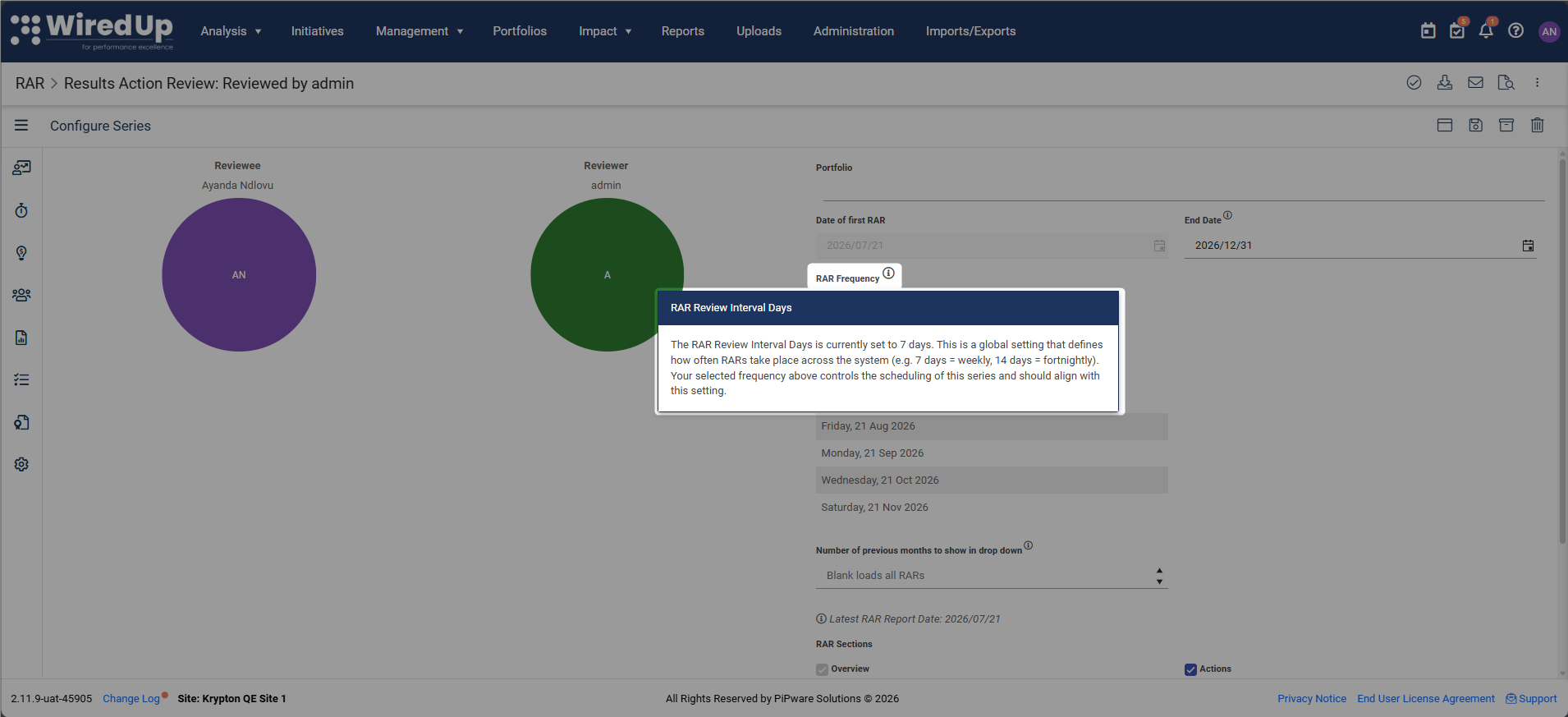
What is RAR Review Interval Days?
This is a system-wide setting (configured in Administration > Settings) that defines the standard interval in days between RARs across your organization. For example:
- 7 days = weekly
- 14 days = fortnightly
How does it relate to RAR Frequency?
The RAR Frequency you configure for your series should align with this global setting. The global setting determines the interval between each RAR, while your selected frequency controls the scheduling pattern for your specific series.
What Happened to the Old Frequency Options?
If you are familiar with the previous RAR configuration, you may notice that the old dropdown with Weekly, Fortnightly, and Monthly options has been replaced. Don't worry—your existing RAR series have been automatically migrated:
Old Frequency | New Configuration |
Weekly | Repeat every 1 week |
Fortnightly | Repeat every 2 weeks |
Monthly | Repeat every 1 month |
All your existing scheduled RARs remain unchanged—only the configuration interface has been updated to give you more flexibility.
Validation Rules
The system enforces the following rules:
- Minimum interval: 1 (for both weekly and monthly)
- Maximum interval: 30 (for both weekly and monthly)
- Date of first RAR required: The Next 5 Occurrences preview will not display until you set this date
- Day derivation: The day of recurrence is always derived from your Date of first RAR—you cannot manually select a different day
Best Practices
Match your organization's cadence — Align your RAR Frequency with the RAR Review Interval Days setting to maintain consistency
Use the preview — Always check the Next 5 Occurrences to confirm your schedule looks correct before saving
Consider your team's availability — Choose a day and frequency that works for all participants
Set an End Date for temporary series — If your RAR series has a defined end point (e.g., project completion), set an End Date to automatically stop scheduling
Review existing series — If you have old RAR series, review them to see if the new flexible scheduling options better suit your needs